Automating sales prospecting: the tools, step by step, in 2026
Sales Navigator, Apollo, Hunter, Dropcontact, Kaspr, lemlist and FindMyLead: what each tool automates, what it costs, and what is better kept in your own hands, such as LinkedIn.
Prospecting is four tasks: finding the right people, finding their email, writing a first message, sending it and following up. Each task has its tools. Some do one, others several. Here is what each one automates, for a services company of 10 to 49 people whose director prospects in person.
This article is written by the FindMyLead team, one of the tools compared. The other tools' prices were read on their pages on 14 October 2026, with links.
Step 1: find the right people
LinkedIn Sales Navigator
Sales Navigator searches people among LinkedIn profiles, by job, and gives 50 InMails a month to write outside your network. The Core plan costs €120.99 a month, or €1,088.88 a year; the Advanced plan €148.21 a month (Sales Navigator plan comparison). LinkedIn notes these prices are estimates that may exclude VAT.
Its page says nothing about email or phone numbers. To write by email, you need a second tool.
Choose it if you mostly prospect inside LinkedIn and want to write to people outside your network: its InMails go out inside LinkedIn, with no email needed.
Apollo
Apollo claims 240 million contacts and 30 million companies. Apollo names three sources: its users who share their contacts, the public web and third-party providers (Apollo's processing notice); it does not publish the French share of its database. The Basic plan costs US$65 per seat per month excluding tax, with 2,500 credits; an email costs 1 credit (Apollo pricing page). Our article Apollo in France describes a test to judge it on your target.
Choose it if you need phone numbers, at 8 credits a number, or you prospect alone and want to start on a free plan, with no time limit, at 75 credits a month (Apollo pricing page).
FindMyLead
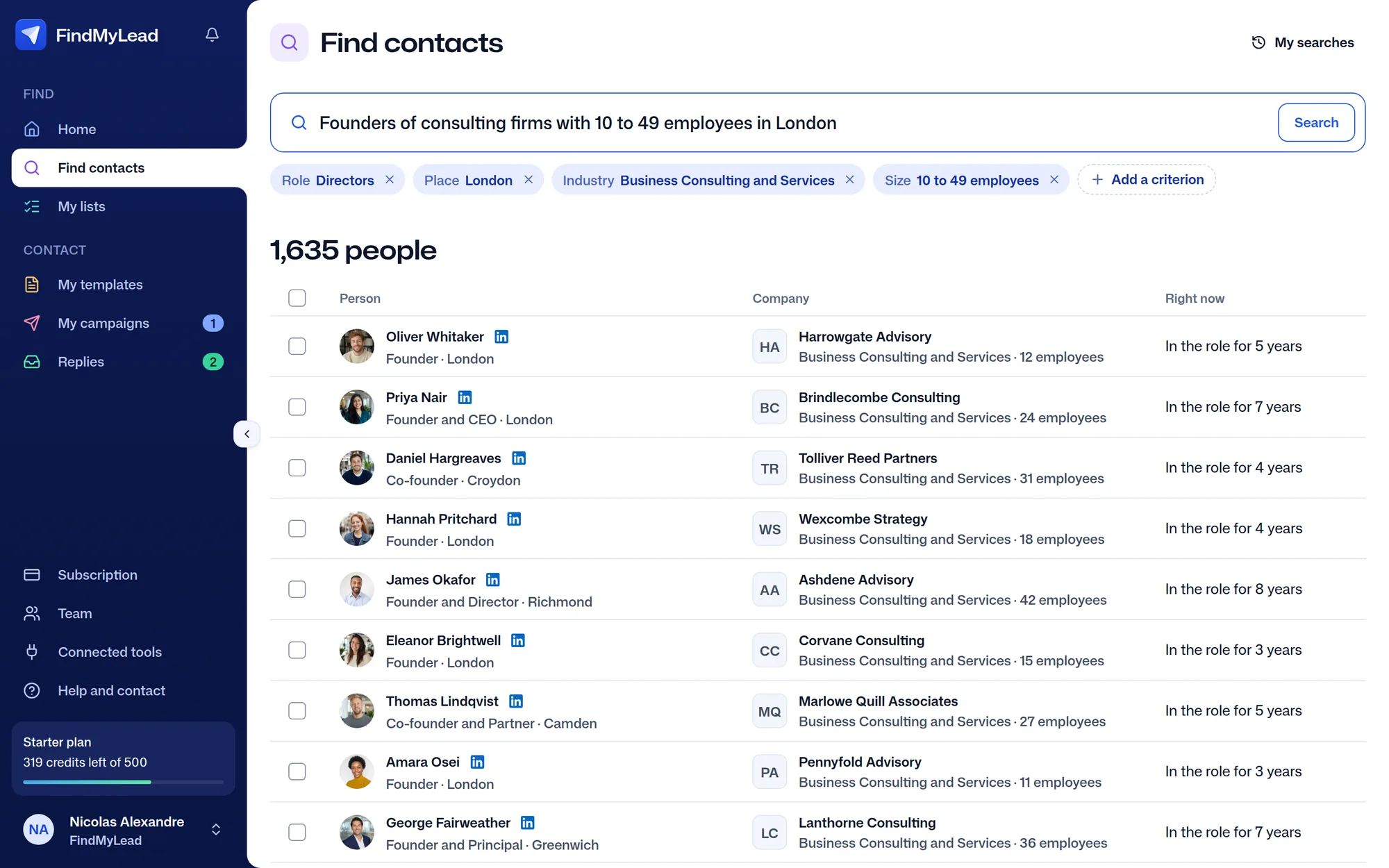
You describe the people to reach in one sentence: "Directors of consulting firms with 10 to 49 employees in Île-de-France". The AI turns it into visible criteria (job, place, size, sector), which you correct. That search returned 1,326 people in October 2026, free to see (the founder use case).
Its data is more than 500 million professional profiles, from every country, according to our data provider (May 2026). FindMyLead has no financial filters (revenue, legal form) and no buying signals. It also covers steps 2 and 3, below.
Their LinkedIn and their email, in one sentence.
Directors of consulting and services firms in Lyon, 10 to 49 employees
Free
Step 2: find the email, and sometimes the phone
Hunter
Hunter finds a company's work emails from its website, and filters by job title in its API (Hunter API documentation). It says it analyzes "millions of websites daily" and indexes 150 million addresses (Hunter's data page). Its documentation does not guarantee each person's LinkedIn profile.
The Starter plan costs €49 a month for 2,000 credits, with unlimited users; one credit pays for one email found, and a search that finds nothing costs nothing. The free plan gives 50 credits a month (Hunter pricing page). The page does not say whether prices exclude VAT. Hunter also sends email sequences.
Choose it if you already know the companies you target and mostly want their emails, as a team: €49 a month for the whole team, or the free plan to start (Hunter pricing page).
Dropcontact
Dropcontact sells no contact database. It works out the email from a name and a company you give it: it "operates exclusively with algorithms and does not use any contact databases", on EU-based servers. You pay only for emails found. The Starter plan costs €29 a month for 500 credits, the Growth plan €35, which adds the LinkedIn profile (Dropcontact pricing page).
So Dropcontact assumes you already have your list of people.
Choose it if you already have the names and the companies, your client file for instance, and only want their emails: €29 a month for 500 credits, paid only for emails found (Dropcontact pricing page).
Kaspr
Kaspr is a Chrome extension that shows a person's email and phone on their LinkedIn profile. It has no search of its own: you search in LinkedIn or Sales Navigator. The Starter plan costs €59 per user per month, €45 a month on annual billing, with unlimited emails and 100 phone credits. A free plan exists (Kaspr pricing page).
Its terms cap "unlimited" at 10,000 credits per account per month (Kaspr terms). You need a LinkedIn account with at least 20 connections. Its help center warns that if you go overboard, "you're running the risk of being flagged as a potential spam or abuse risk by LinkedIn's algorithms" (Kaspr's profile visit guidelines).
Choose it if you want the phone number of the people you find on LinkedIn: the Starter plan includes 100 phone credits a month, and a free plan lets you try it (Kaspr pricing page). Our article on Kaspr alternatives compares its prices and its limits.
Step 3: write and send the emails
lemlist
lemlist sends email sequences from your Google, Microsoft or SMTP mailboxes, warm-up included. The Email plan costs €69 a month excluding VAT, unlimited users, up to 50,000 emails a month, with no credits for finding emails (lemlist pricing page, lemlist help center). Its AI agent, lemAgent, writes every message and waits for your approval before launching. Details in our article lemlist pricing and reviews.
Choose it if you send a lot of emails and want to tune every condition and every delay, or automate LinkedIn and calls in the same sequence with the Multichannel plan (lemlist pricing page).
FindMyLead
The AI writes a LinkedIn message and an email for each person on your list, from their job, their profile and their company. You review before sending. Emails go out from addresses created in your company's name, with a ramp-up over the first days, automatic follow-ups and handling of "STOP" unsubscribes.
A credit pays for one contact and their LinkedIn profile; their work email is looked up at no extra credit, found or not. FindMyLead costs €69 a month for 500 credits, for the whole team, sending domains included (our pricing). VAT does not apply: the price shown is the price paid (our pricing). Sending starts with the subscription, not during the trial.
Step 4: LinkedIn, automate or not
LinkedIn automation tools, such as lemlist Multichannel or Waalaxy (Waalaxy's home page), send invitations and messages from your account. LinkedIn writes that members who use them "risk having their accounts restricted or shut down" (LinkedIn help page on prohibited software). lemlist advises at most 20 invitations a day (lemlist account limits) and reminds users that only LinkedIn controls its restrictions (lemlist's article on LinkedIn restrictions).
What you risk is the account that holds your network and your clients. The other way: a tool prepares the message, and you send it yourself. FindMyLead works that way: it never acts on your LinkedIn account. To compare both approaches, read our FindMyLead, Waalaxy, lemlist and Apollo comparison.
Assemble several tools, or use one
Assembling works: Sales Navigator Core and Hunter Starter cost €169.99 a month together for one person, before any VAT and before sending mailboxes (Sales Navigator prices, Hunter prices). Each extra user adds a Sales Navigator seat.
The question to ask yourself: how many tools do you want to learn, and how many people on the team will prospect?
Frequently asked questions
Which tool finds a company director's email?
If you already have their name and company, Hunter or Dropcontact work out the address. If you start from LinkedIn, Kaspr shows it on their profile. If you start from nothing, you first need a tool that searches people by job.
Can LinkedIn be automated without risk?
No. Tools limit their actions to reduce the risk, but LinkedIn alone decides to restrict an account. The automation runs on your own account.
Does Sales Navigator give emails?
Its plan comparison page does not mention them. It gives InMails, messages sent inside LinkedIn. For email, you need a tool such as Hunter, Kaspr or Dropcontact.
Do I need a different tool for each step?
No. lemlist and Apollo find emails and send them. FindMyLead finds the people, looks up their email, writes the messages and sends the emails, without automating LinkedIn.